Product Mapping
Prefer to see it in action? Open the guided walkthrough — an animated, click-by-click tour you can play automatically or step through yourself.
Product Mapping is where you link Shopify variants to Amazon ASINs. Once a variant is mapped, the app pulls the live Amazon price, whether you are winning the Buy Box, and a short price history into Shopify — so you always know how your Amazon offer compares.
What it does
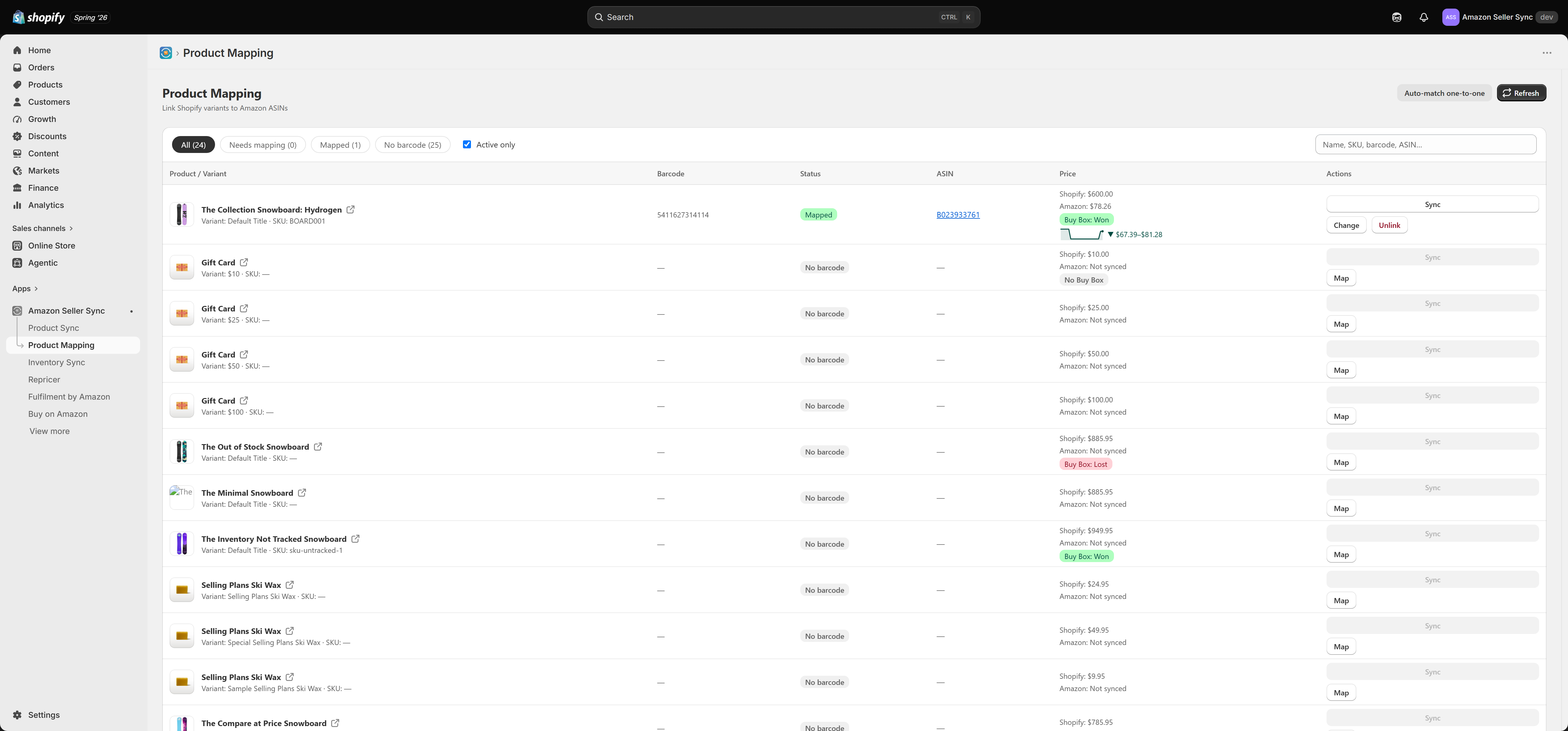
The page lists your active Shopify products and variants with, for each one:
- Barcode — the variant's barcode (UPC/EAN), used for automatic matching.
- Status — mapped, needs mapping, or no barcode.
- ASIN — the linked Amazon product, with a link to the Amazon listing.
- Price — your Shopify price, the live Amazon price, the Buy Box result (Won, Lost, or No Buy Box), and a price-history sparkline.
- Actions — map, change, unlink, or sync a single product.
Filtering and searching
Use the tabs at the top to narrow the list — All, Needs mapping, Mapped, and No barcode — and the Active only toggle to hide draft and archived products. The search box matches on product title, SKU, barcode, or ASIN, so you can jump straight to the item you want.
Mapping a variant
There are two ways to map:
- Auto-match one-to-one — the app matches variants to Amazon ASINs by barcode. This is the fastest way to map a catalogue that has barcodes. Any variant without a confident match is left for you to map by hand.
- Map by hand — select Map on a row, find the correct Amazon listing, and link it. Use this when a variant has no barcode, or when you want to override an automatic match.
If a mapping is wrong, use Change to relink it or Unlink to remove the mapping.
Your plan sets how many variants you can map. When you reach the limit, mapping more is blocked until you unmap some or upgrade. You can see your usage on the Plans page.
Reading the Buy Box and price
For each mapped variant the Price column shows:
- Shopify — your current Shopify price.
- Amazon — the live lowest Amazon price for that ASIN.
- Buy Box — a badge showing whether your offer is winning (Won), losing (Lost), or there is No Buy Box.
- Price history — a small sparkline of the recent Amazon price range, so you can see how volatile the listing is.
Syncing prices
- Sync on a row refreshes the Amazon price and Buy Box for that single product on demand.
- Refresh at the top reloads the whole list.
- Scheduled syncs run automatically in the background at your plan's interval, and the Sync now button on the Home dashboard refreshes everything at once.
Where mapping data appears
Mapped prices and Buy Box status feed the Home dashboard stat tiles, the Analytics Buy Box report, and the Repricer. If you use the Amazon Buy Button, mapping is also what lets the storefront block show the right Amazon offer.