Amazon Buy Button
Prefer to see it in action? Open the guided walkthrough — an animated, click-by-click tour you can play automatically or step through yourself.
The Amazon Buy Button adds an "Available on Amazon" button to your storefront, so shoppers who would rather buy on Amazon can do so in one click. You control which link each button uses and whether to add tracking. The Buy Button is available on every plan.
Adding the button to your theme
The button is a theme app block. Add it to a product page in the Shopify theme editor wherever you want it to appear, then use this page to control where it links and how it behaves.
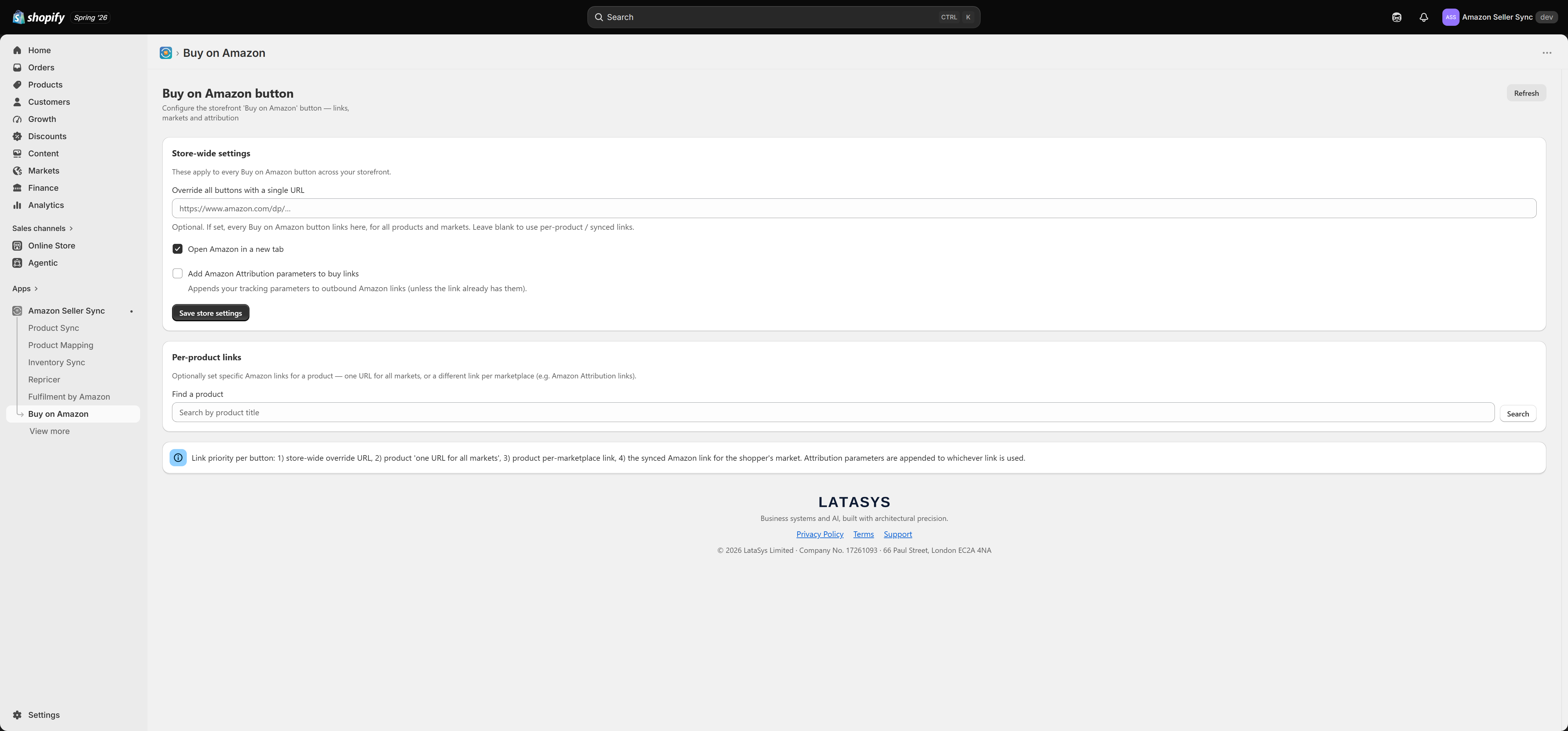
Store-wide settings
These apply to every Buy on Amazon button across your storefront:
- Override all buttons with a single URL — optional. If set, every button links here for all products and markets. Leave it blank to use per-product or synced links.
- Open Amazon in a new tab — keep the shopper's session on your store while opening Amazon alongside.
- Add Amazon Attribution parameters to buy links — appends your tracking parameters to outbound Amazon links (unless the link already has them), so you can measure the traffic you send to Amazon.
Select Save store settings to apply.
Per-product links
You can also set specific Amazon links for an individual product — either one URL for all markets, or a different link per marketplace (useful for Amazon Attribution links). Search for a product to set its links.
How the link for each button is chosen
When a button renders, the app picks the link in this priority order:
- The store-wide override URL, if set.
- The product's one URL for all markets, if set.
- The product's per-marketplace link for the shopper's market, if set.
- The synced Amazon link for the shopper's market (from your mapped listing).
Amazon Attribution parameters are appended to whichever link is used.
Per-marketplace links use the same market matching as the rest of the app, so a shopper in a given market sees the Amazon link for that market. Mapping products in Product Mapping is what supplies the synced Amazon link used at priority 4.